
I’ve got a long job running on the mill today and poor doggo really, REALLY wanted to go for a run. Since you should never leave your CNC running unattended and I really like it when doggo is happy, I wanted to pause the job and come back to it later. Unfortunately, there’s no obvious way to do this in Universal Gcode Sender (UGS). There’s a pause button, and while it stops the feed, it doesn’t stop the spindle, which can end up causing a fire if the bit just sits there and spins in the same spot.
After poking around in the menus for a minute, turns out there’s a two-step way to pause the feed as well as the spindle. Go into Machine, then Real Time Overrides, then Toggle, and you’ll see the following:
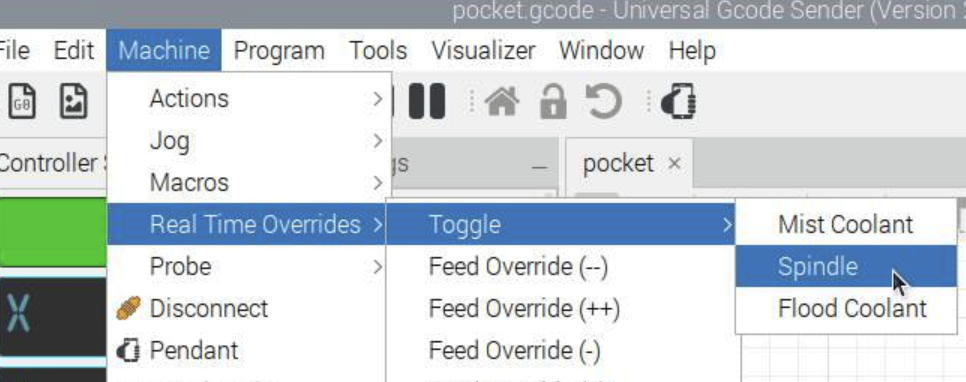
Yep, that appears (on my setup, anyway) to turn the spindle off (or turn it on again if it’s already off). Makes sense!
So you’ll want to hit the pause button, then quickly dash through the menu and toggle Spindle to turn it off. Note that neither of these steps will turn off power to the X/Y/Z steppers, they’re held in position during the pause.
To resume your job, check your mill and the surface to make sure everything looks ready to go, then turn the spindle back on and click the Run button on the main screen. Don’t do the steps the wrong way around or you’ll break a bit, damage your work surface, or put extra stress on your machine!